


Chase issues some of the best business credit cards on the market, offering valuable rewards, travel perks and useful tools for freelancers, side hustlers and small-business owners. But applying for one isn’t quite the same as applying for a personal card, and it’s worth understanding a few key rules and requirements before you start.
One of the biggest factors to keep in mind is Chase’s 5/24 rule: If you’ve opened five or more credit cards (from any issuer) in the past 24 months, you likely won’t be approved for a new Chase card — including business ones. The good news? Most business cards (including Chase’s) don’t show up on your personal credit report, so they don’t count against your 5/24 limit.
Whether you’re a full-time entrepreneur or earn a little extra from freelance work, a Chase business card could be within reach. Here’s everything you need to know to complete the application.
Who qualifies for a Chase business card?
A Chase business card application is very similar to a Chase consumer card application, but there are a few differences. The biggest difference is that you’ll need to have a business that earns revenue. That may be easier to achieve than you think — you don’t need a full-time business or even a six-figure income from your business activities to be approved for a small-business card.

If you do have a business, having a business card isn’t just a good way to earn extra rewards — it’s also essential to keeping your business and personal expenses separate. For instance, you can qualify for a business card as a part-time freelance writer, designer, consultant or artist. Also, gigs where you aren’t an employee — like driving for Uber or Lyft, delivering food or walking dogs through apps like Rover or Wag — can also be eligible businesses.
Related: Who qualifies for a business credit card?
How to complete a Chase business card application
Let’s review the Chase business card application and identify the information that’s most likely to confuse you.
All Chase business credit card applications will look the same, but if you’re applying for a cobranded business card, such as the Southwest® Rapid Rewards® Performance Business Credit Card (see rates and fees) or the United℠ Business Card (see rates and fees), you’ll have the option to add your loyalty program number. If you don’t add a number, one will be assigned to you and a new loyalty account will be created in your name. This can be a bit of a headache if you already have a loyalty account because you’ll end up having to merge the two accounts.
If you’re already a Chase customer, you can log in to your account for a quicker application process, as some information will be pre-filled.

Daily Newsletter
Reward your inbox with the TPG Daily newsletter
Join over 700,000 readers for breaking news, in-depth guides and exclusive deals from TPG’s experts
Here’s the information you’ll need to add to the application:
- Legal name of business: If you’re a sole proprietor — meaning your business is just you operating under your own name — you can use your name as the “legal business name.” However, if you’ve filed with your local or state government for a DBA (doing business as) name, you’ll enter that name here. Also, if you’ve set up any sort of legal business structure, like an LLC, your “legal business name” will be the name of the LLC or other entity. A very important note here: Do not make up a business name if you don’t have a DBA for it. Chase may ask for proof of your business and if you don’t have a DBA under the business name you entered in this field (aside from your own personal name), you’ll likely be denied for a card.
- Business name on card: This doesn’t have to be your legal business name because it’s just the business name that will be etched onto your card (just below the cardholder’s name). You might need to abbreviate the name you enter here because longer names might not fit.
- Business mailing address: If you work at home or don’t have a business address, entering your home address is fine.
- Business structure: If you’re the only owner, then select “sole proprietor.” If your business has two or more owners, choose “partnership.” If your business is registered as any of the other options (LLC, corporation, non-profit), select the appropriate option.
- Business phone: This can be a home or mobile phone.
- Tax ID type: If you’re a sole proprietor, you can use your Social Security number as your tax ID. Otherwise, you’ll need a federal EIN (Employer Identification Number), which you can easily apply for with the IRS.
- Number of employees: Enter the number of all additional employees, not including yourself. Enter “0” if you’re the only employee.
- Annual business revenue/sales: This is the total annual income of your business before you deduct any expenses or taxes. This doesn’t need to be a huge number — some new businesses get approved with little or no income, but if you do have business revenue, it’ll certainly improve the likelihood of getting an approval.
- Business establishment date: You’ll need the date the business was formed
- General industry/category/specific type: Choose the options that best describe your business.
Step 1: Authorizing information, personal details and identification
Let’s take a look at the first part of the Chase business credit card application page.
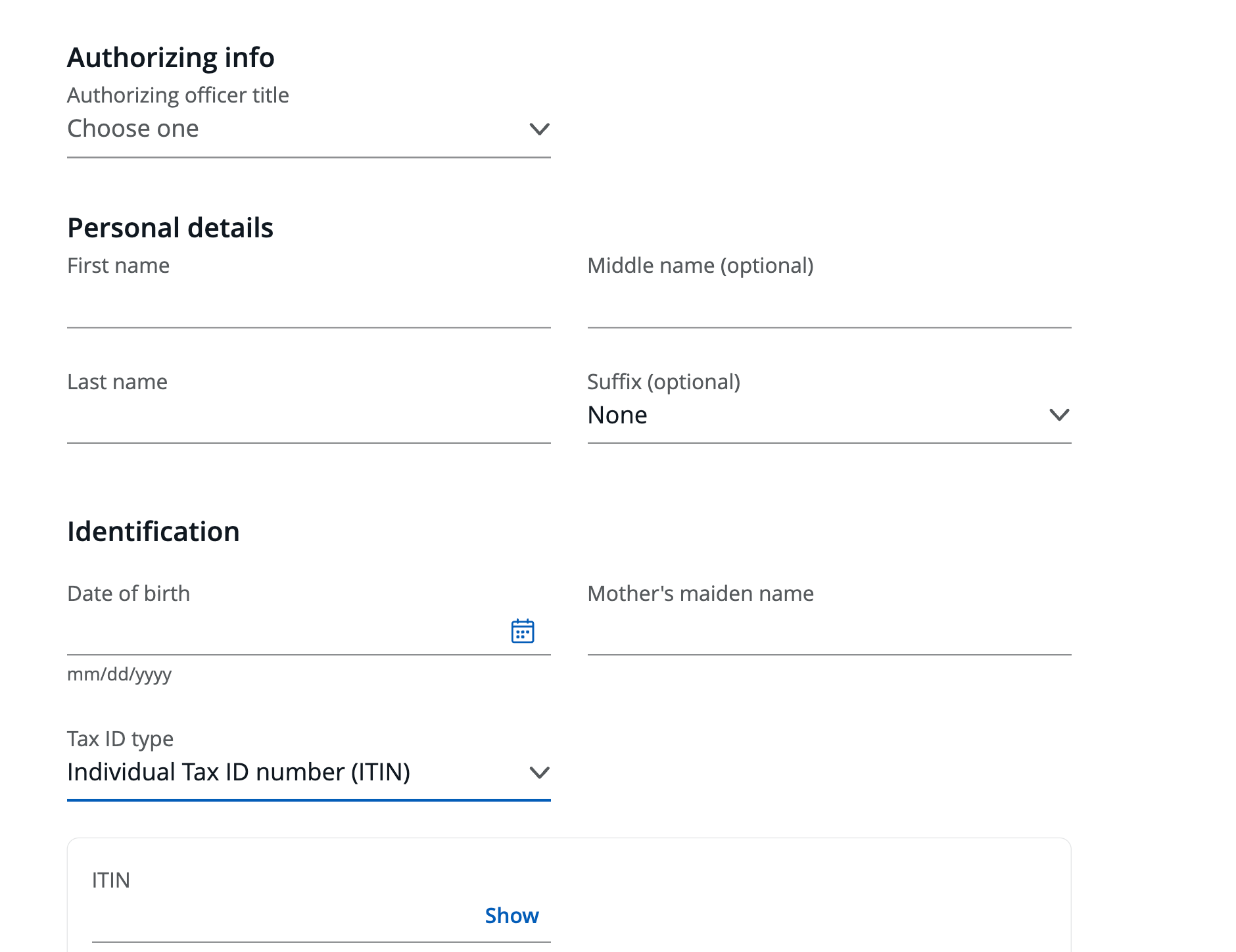
Authorizing info refers to your role in the company, such as owner, partner, president or treasurer; if you’re a sole proprietorship, select “owner.”
Under Tax ID, this is where you choose if you’re applying with your Social Security number or Tax ID number. If you choose to use your Social Security number, you will see a disclosure that you have to read and accept the terms.
Step 2: Home address and contact information
Now you’ll scroll down to the second part of the Chase business credit card application page:
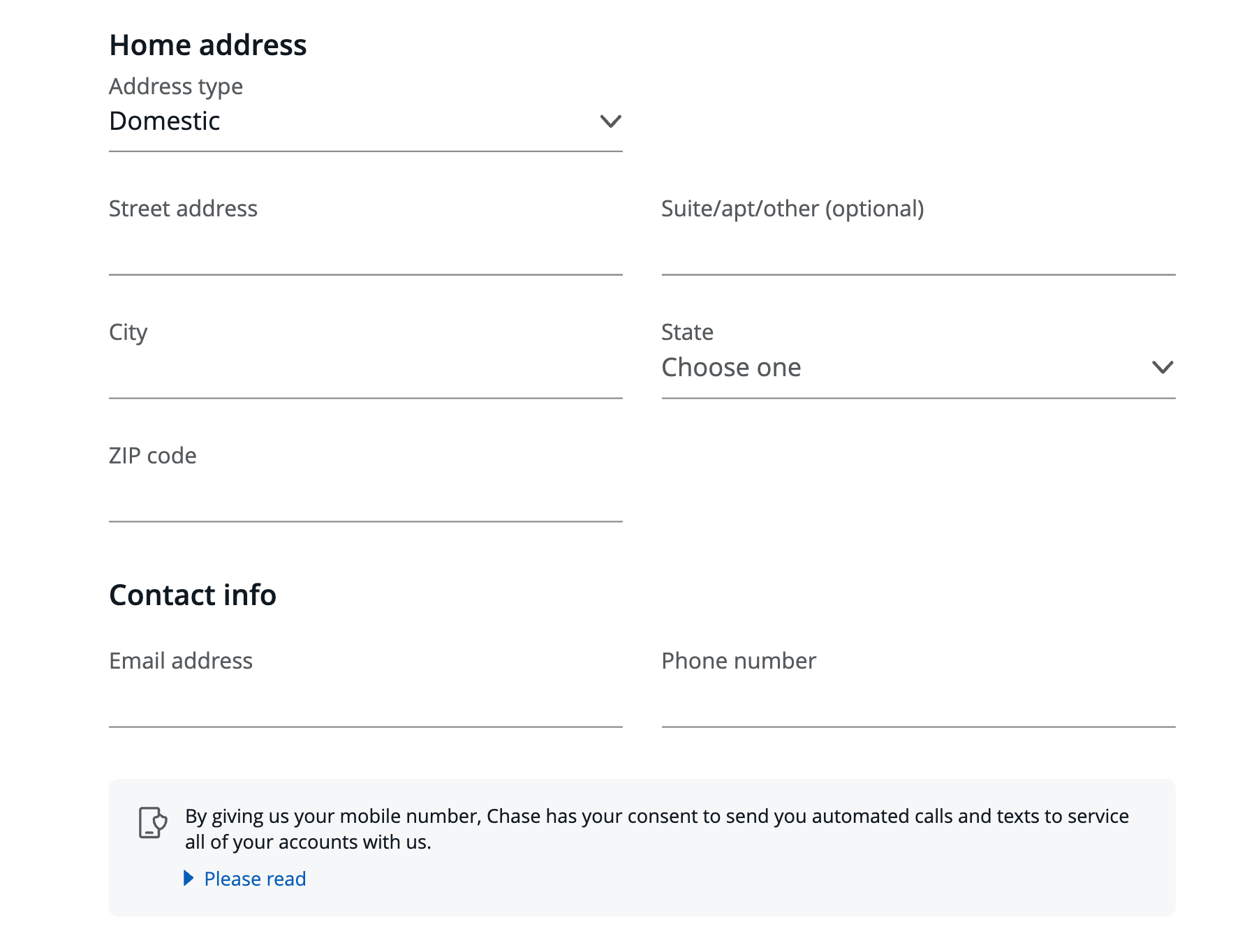
Most of the personal information you have to fill out is fairly straightforward.
Step 3: Financial info, business structure and details
Now you’ll scroll down to the third part Chase business credit card application page:
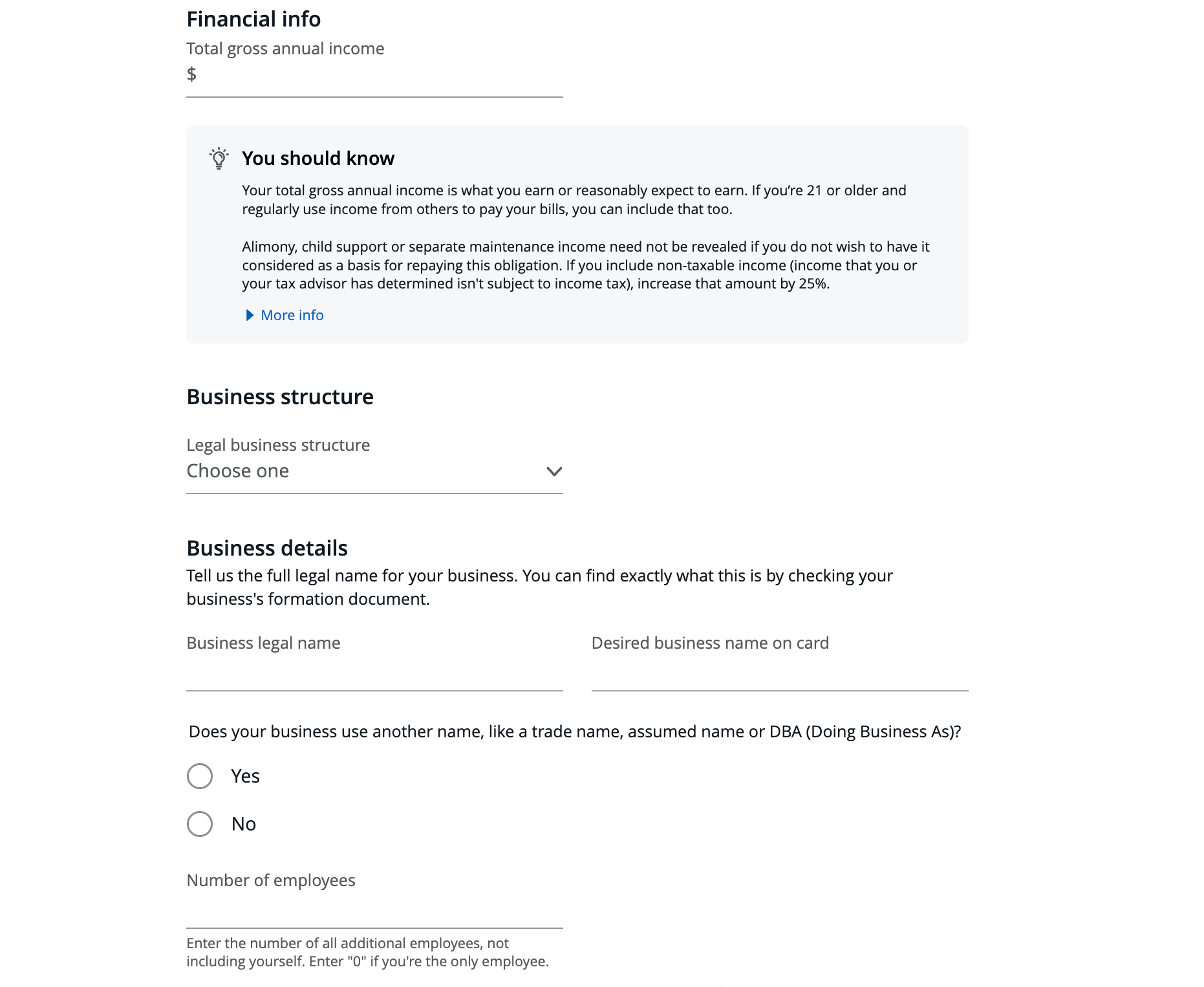
When it comes to your “total gross annual income,” you want to be sure to include any eligible income, which, according to Chase, includes:
- Full-time or part-time jobs
- Dividends
- Interest
- Internships
- Public assistance
- Seasonal jobs
- Social Security benefits
You can also include “money that someone else deposits regularly into your account,” and if you’re 21 or older, you can include any income from others that you regularly use to pay your bills. So if you’ve got a partner or spouse you split the bills with, it’s OK to include their yearly salary with yours.
Under “Business details,” enter your business name — or your legal name if you’re a sole proprietor — along with the name you’d like printed on the card. After that, enter the number of employees.
Steps 4 and 5: Business Tax ID, Business address, contact info, financials, business classification and employee cards
Next scroll down some more.
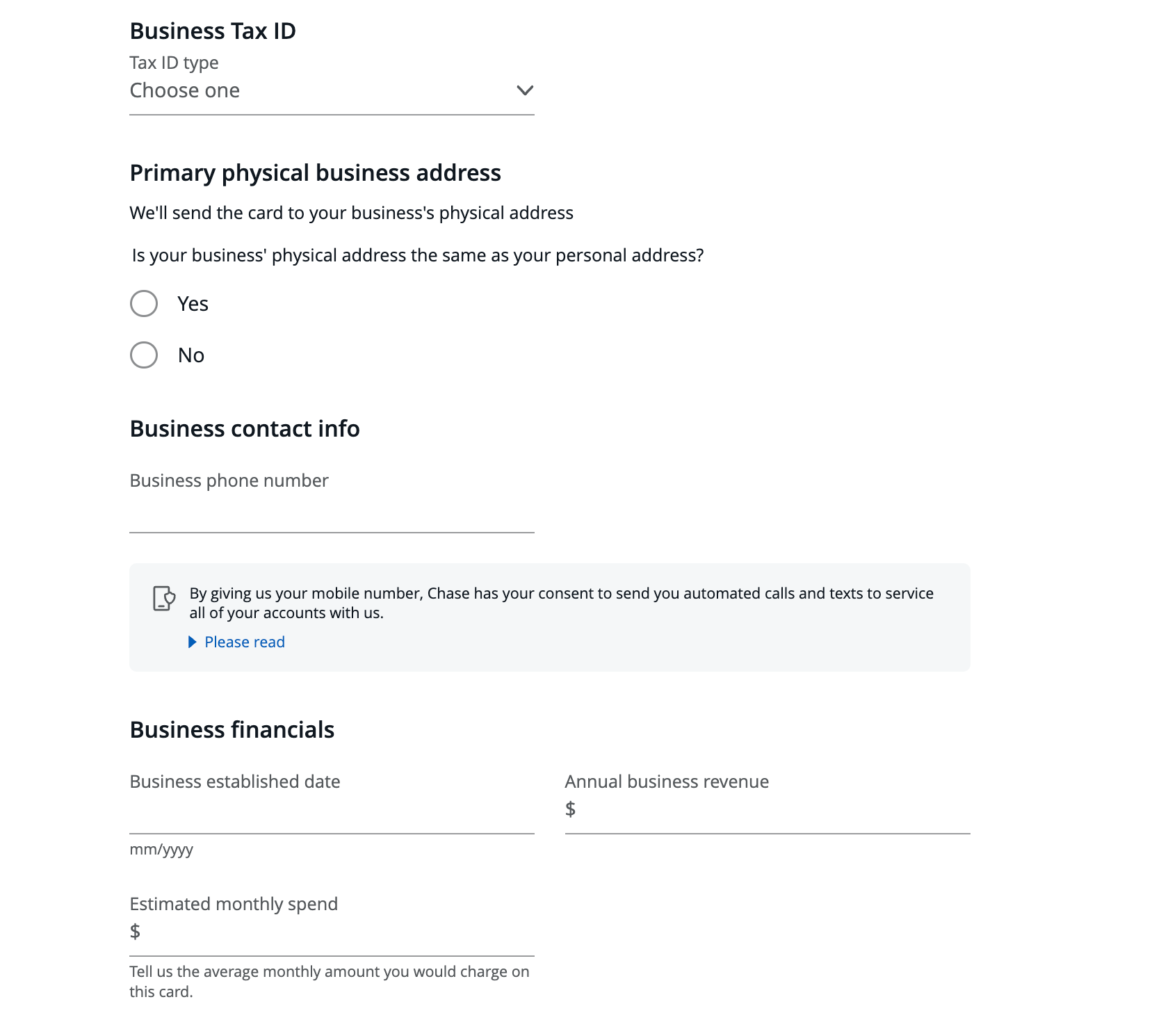
Now, input your business tax ID and primary address. For your address, this can be the same as your home address if you don’t have a physical location. Your business number can be your personal number if you don’t have a business number.
For the business financials section, enter the date your business was formed. Then enter the annual business revenue, which is the amount the business makes before deducting any expenses or taxes.
Then enter your estimated monthly spending.
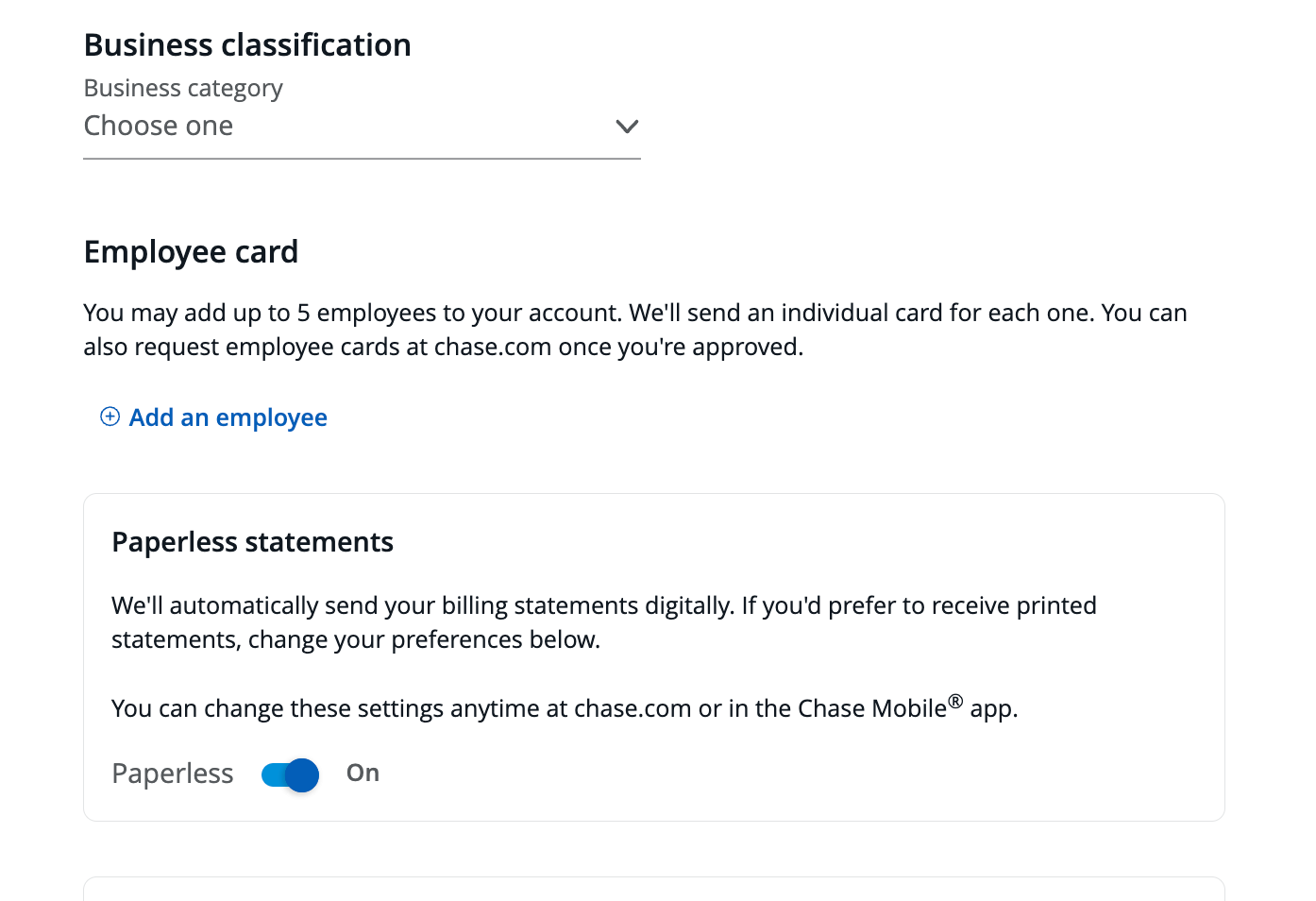
Lastly, under “business classification,” select the appropriate field your business is in. You also have the option to add employee cards and can select if you would like to receive paperless statements.
After filling out the required information, review the terms before submitting. At the very bottom, just above the “Submit” button, there’s a box you’ll need to check to show you’ve read and agreed to the terms.
Related: How to get a business credit card
Bottom line
Applying for a Chase business credit card is more straightforward than many people realize. As long as you earn income from a qualifying business activity — even part-time freelance work or gig jobs — you may be eligible.
Just make sure the information you enter is honest and consistent, especially regarding your business name, structure and revenue. Chase may request verification, so it’s important to be accurate.
A business credit card isn’t just a way to earn rewards — it also helps you separate business and personal finances, simplify your bookkeeping and strategically manage your 5/24 count. If you’re eligible, taking the time to apply could be a smart next step in your points and miles strategy.
Related: How to pick a strategy for your small-business credit cards

